HR & payroll software for schools & institutes Staff attendance, leave and salaries — without the register.
For schools, colleges, coaching centres and institutes: teaching, office and transport staff on one system, each with their own timings.

Staff attendance · today
School timing · 7:45 AM
- Primary18 / 19
- Secondary24 / 26
- Office & accounts6 / 6
- Transport9 / 11
Parent-teacher meeting on Saturday
Announcement · All teaching staff
Sounds familiar?
The way it usually goes.
Teaching staff, office staff and drivers each follow different timings. The attendance register lives in the staff room, leave is a paper slip, and salaries are worked out from both at the end of the month. Notices go out on a WhatsApp group that half the staff has muted.
A register in the staff room
Attendance written by hand, then counted again at month-end.
Different timings for everyone
Teachers, office staff and drivers start and finish at different times.
Leave on paper slips
Slips get lost, and nobody knows how many days anyone has left.
Notices nobody reads
Important updates buried in a group chat half the staff has muted.
With OthTech
Everything your schools & institutes team needs.
Check in on arrival
Staff check in from their phone with the time and location recorded.
Timings by staff group
Separate shifts for teaching, office and transport staff, each with its own hours.
Your holiday calendar
The year's holidays and vacations visible to every staff member.
Leave with balances
Leave types that match your policy, applied and approved in the app.
Announcements that arrive
Notices pushed to every staff member's phone instead of a chat group.
Salaries from attendance
Payroll that already knows who was present, with payslips for everyone.
- Staff check in from the app on arrival, with the time and location recorded
- Different shift timings for teaching, office and transport staff
- Leave applied and approved in the app, with your own holiday list for the year
- Announcements pushed to every staff member's phone, and payroll that already knows who was present
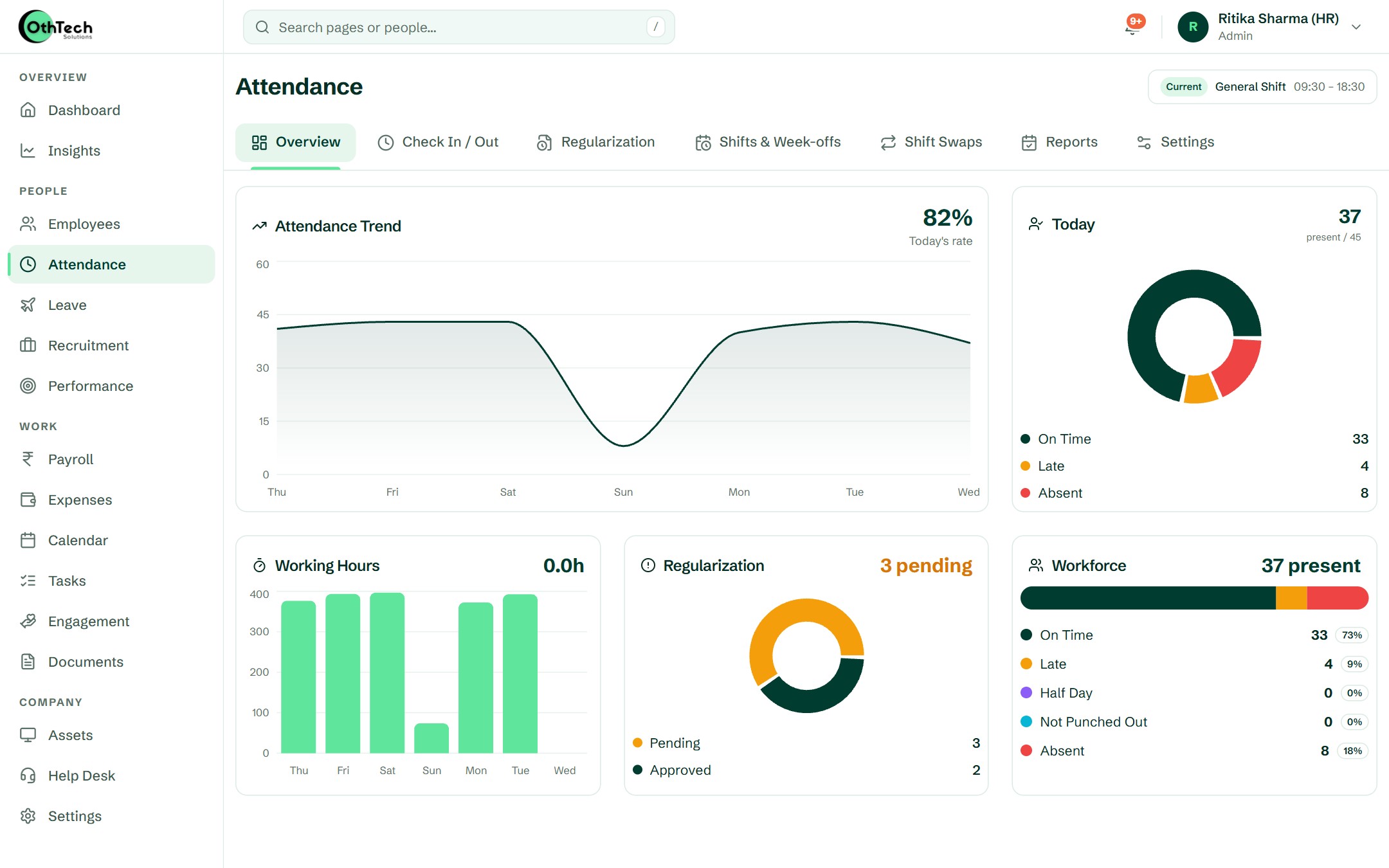
In the product
What your team will actually see.
Captured from a demo company on OthTech — no mock-ups.
Getting started
Up and running in four steps.
- 1
Add your staff
Import teaching and non-teaching staff from Excel, grouped by department.
- 2
Set timings & holidays
Create shifts for each staff group and publish the year's holiday list.
- 3
Staff use the app
Check-ins, leave requests and notices — all from their own phone.
- 4
Pay at month-end
Run payroll with attendance and leave already counted.
Can teaching and office staff have different timings?
Yes. Create a shift for each group — teaching, office, transport — and assign staff to it. Late marks and half-days follow each shift's own hours.
Can we publish our academic-year holidays?
Yes. Add your holiday list once and every staff member sees it in the app and the calendar.
Do staff need a computer?
No. Staff use the OthHR app on their own phone for check-ins, leave and payslips.
Other teams we build for

Startups & IT services
Hiring, onboarding, leave and payroll for startups and IT services companies — in one place, so the founder stops being the HR department.

Factories & field teams
For factories, warehouses, plants and field teams: morning, evening and night shifts, location check-ins, comp-offs and shift swaps — sorted before payroll.
Retail, clinics & multi-location
For retail chains, clinics, restaurants and businesses with more than one location: local managers run their teams, and you see everyone at once.
Get started
Try it with your own team.
Free trial, no card needed. Set up your company in an afternoon.
- Free trial, no card needed
- Web and Android
- Help from the team that builds it
Ready when you are
Set up your company in an afternoon, or let us walk you through it first.