Attendance app with GPS & geofencing Know who's in before your first coffee.
Employees check in from the OthHR app or the web, with their GPS location recorded and, if you switch it on, a geofence around each office or site. Managers see the whole day at a glance, and corrections reach the right approver without an email thread.
What you get
Attendance & Shifts, in detail.
Check-in & check-out
- Check in from the mobile app or browser
- GPS location captured with every check-in
- Geofence: check-ins only within a set radius of your sites
- Optional selfie or office-network (IP) check-in
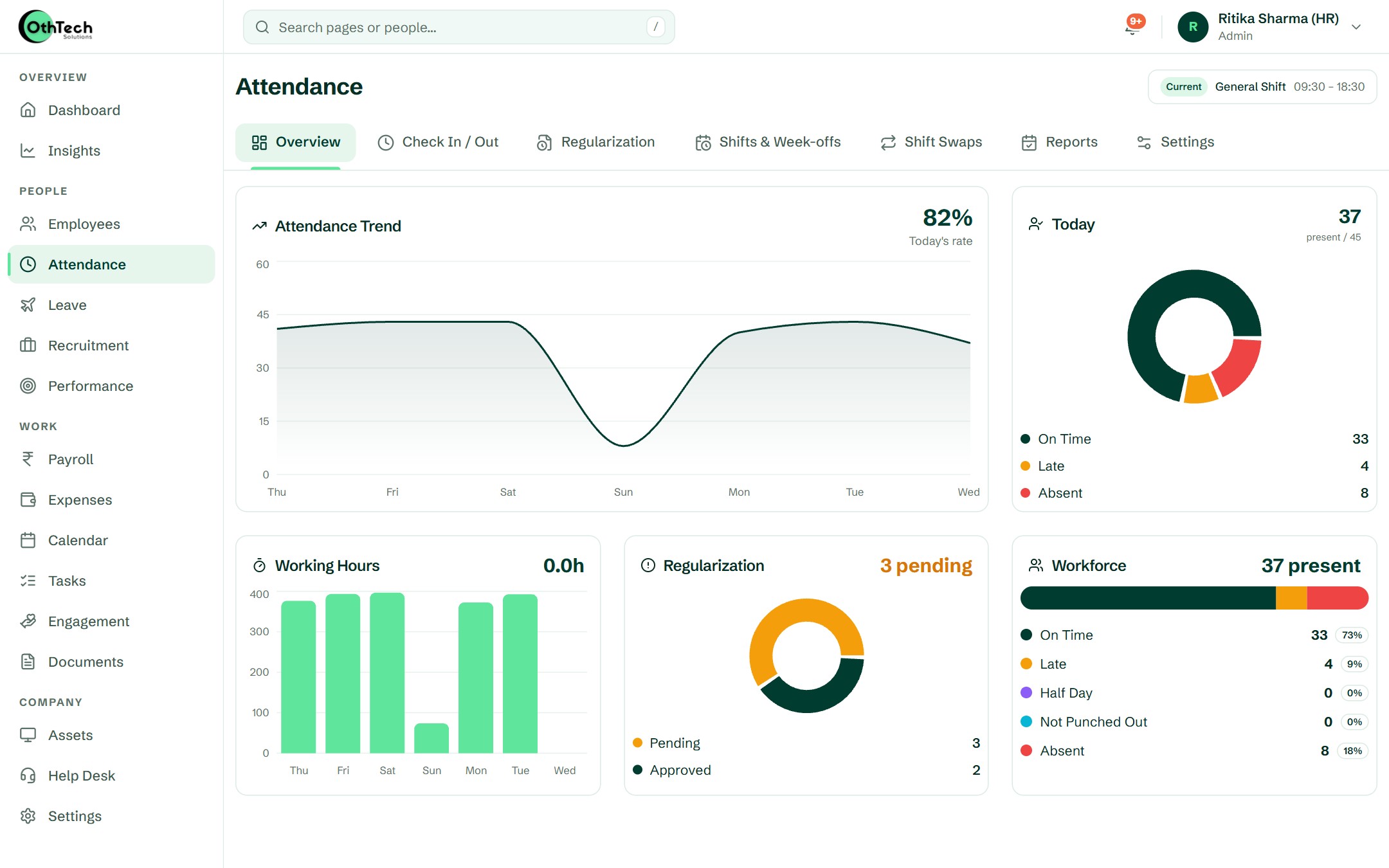
- Live view of who's present, late or on leave today
- Automatic cut-off at the end of each shift
Shifts & week-offs
- Multiple shifts with their own timings
- Assign shifts per employee and change them over time
- Configurable week-offs for every team
- Employees request shift swaps; managers approve
Corrections & approvals
- Regularisation requests for missed or wrong punches
- Manager and admin approval levels
- Comp-off credited for work on week-offs and holidays
- Every change recorded with who approved it
Reports
- Daily, weekly and monthly attendance reports
- Late marks, half-days and overtime at a glance
- Export for payroll and audits
- Attendance flows straight into payroll
In the product
The screens your HR team opens every morning.
Captured from a demo company on OthTech, in today's design — no mock-ups.
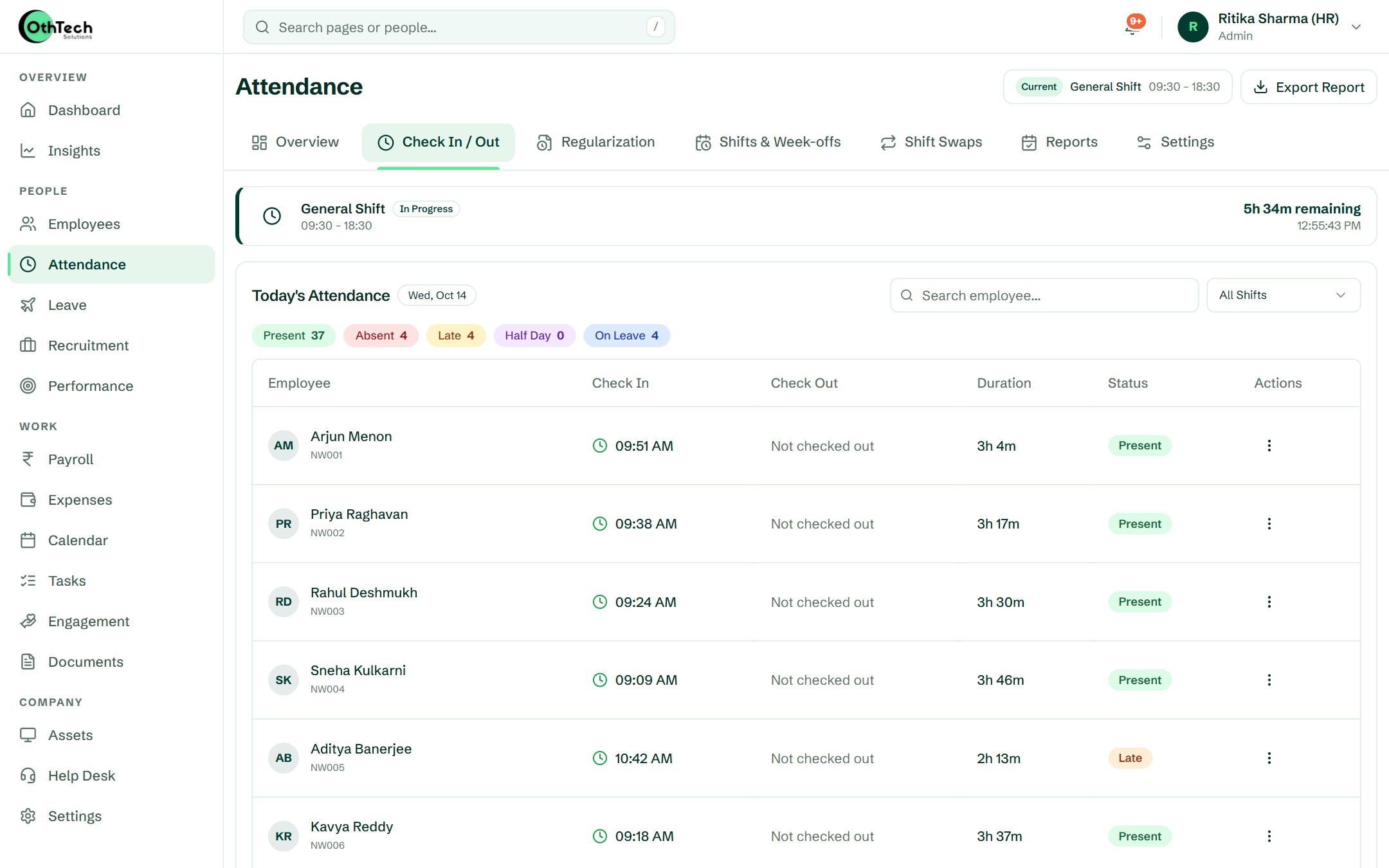
Overview. The week's trend, who is in today, working hours and pending regularisations — on one screen.
How it works
Four steps. Then it runs itself.
- 1
Set up shifts
Create your shifts and week-offs once, then assign them to teams or individuals.
- 2
Employees check in
From the OthTech app with their location — or from the browser at the office.
- 3
Managers approve fixes
Regularisation and shift-swap requests arrive as notifications to approve in a tap.
- 4
Payroll picks it up
Present days, leave and late marks are ready when you run payroll.
Attendance
Friday, 16 October
Present
42/48
On leave
3
Late
2
- AM09:02On time
Aarav Mehta
Engineering
- IR09:14Late · 14m
Ishita Rao
Design
- KS08:51Field · Noida
Kabir Singh
Sales
- MI—On leave
Meera Iyer
Finance
- RG08:58On time
Rohan Gupta
Support
Leave request
Ananya Bose
Casual leave · 14–15 Nov · 2 days
Week 46 · Engineering
97% on time
Questions
About attendance & shifts
Can field staff check in from anywhere?
Yes. Check-ins from the mobile app record the location, so field and sales teams can mark attendance from client sites. Employees you mark as "work from anywhere" are never held to a geofence.
How does geofenced attendance work?
Add your offices or sites with a radius (20 m to 5 km). With the geofence on, a check-in or check-out from the app only goes through when the phone's location is inside one of those sites.
Can we require a selfie at check-in?
Yes, as an option in attendance settings. The photo is kept with that day's record, along with the address it was taken at.
What happens if someone forgets to check out?
The shift cut-off closes the day automatically, and the employee can raise a regularisation request if the record needs correcting.
Do you support rotating shifts?
Yes. Create as many shifts as you need and change an employee's shift whenever the roster changes; shift-swap requests are approved by managers.
Can late marks turn into leave?
Yes, if you want them to. Set the late and half-day thresholds, and optionally a rule that deducts leave after a number of late marks in a month.
Works together with
Get started
Try it with your own team.
Free trial, no card needed. Set up your company in an afternoon.
- Free trial, no card needed
- Web and Android
- Help from the team that builds it
Ready when you are
Set up your company in an afternoon, or let us walk you through it first.